Best Shopify SEO App: How to Choose One That Actually Moves Rankings
Most Shopify SEO apps do the same eight things. Here is what actually distinguishes them, and how to test one before you commit.
Why most Shopify SEO apps look identical
Open the Shopify App Store, filter to SEO, and read ten listings. Nine will offer the same feature set: bulk meta tag editing, image alt text, JSON-LD schema, a sitemap tool, broken link detection, page speed scoring, and some form of AI writing. The screenshots differ. The capability does not.
That similarity is not laziness. Those features are the parts of SEO that are straightforward to automate against the Shopify API, so everyone automates them. The result is a category competing on price and feature count rather than outcome.
The useful question is not which app has the longest feature list. It is which app does the part that is hard.
The difference that matters: reporting versus doing
Sort every app into one of two buckets and the category becomes much easier to read.
Apps that tell you what is wrong
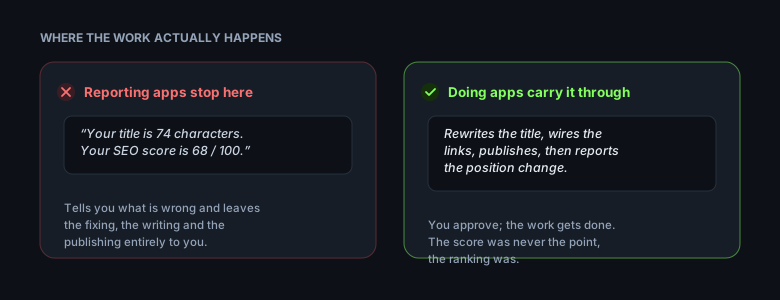
These scan your store and produce a list: 47 products missing meta descriptions, 12 images without alt text, 3 broken links. Genuinely useful the first time you run one. The problem is that the list is the deliverable. Fixing 47 meta descriptions is still 47 pieces of writing, and the app has handed the work back to you.
Apps that do the work
These produce the thing the audit asked for. Written copy, published content, links actually placed. The distinction sounds subtle and is not: one saves you an audit, the other saves you the month of work the audit implies.
When comparing apps, the sharpest test is to ask what you are left holding after the app finishes. A list, or a result.
The two types side by side
Audit apps
Campaign apps
Output
A list of issues
Published pages and links
Fixes meta tags
Yes, in bulk
Yes, per campaign
Writes content
No
Yes
Places internal links
Reports on them
Builds them
Work left with you
All the writing
Review and approval
Typical price
Free to $30/mo
$15 to $150/mo
Best when
Large catalogue, thin tags
Few pages, no rankings
Neither type is better in the abstract. A store with 900 products and empty meta descriptions has a bulk problem, and an audit app solves it in an afternoon. A store with 30 products and no organic traffic has a content problem, and no amount of tag editing solves it.
What to look for
Content, not just tags
Meta tags matter and they have a ceiling. A product page with a perfect title tag still cannot rank for the questions buyers ask before they know your product exists. Only content ranks for those, and content is the part most apps do not touch because it is the part that is hard to automate well.
Internal linking that is actually built
Several apps will report that your internal linking is weak. Very few will place the links. Internal links are how authority moves between your pages, and placing them well requires knowing which pages should support which, not just detecting that a page has few inbound links.
Rank tracking on your real domain
Check that an app tracks positions for your custom domain rather than your myshopify address. A store still on its myshopify host has no meaningful organic presence to measure, and an app that reports positions against it is reporting on a site nobody visits.
Approval before anything publishes
Any app that writes to your storefront should show you the work before it goes live. Auto-publishing to a live store is a category of risk no ranking gain justifies, and reputable apps make review the default rather than an option.
Coverage of AI answers
A growing share of buyer research now happens inside ChatGPT, Perplexity and Google's AI Overviews. Those answers are assembled from cited sources. An app that only measures classic blue-link positions is measuring a shrinking part of the picture.
Want this done for you?
Rankmore writes the cluster, links it, and tracks the rankings.
SEO scores out of 100. Every app computes them differently and none of them is Google's. A score moving from 62 to 84 tells you the app is satisfied, not that anything ranks better.
Feature counts. Twelve features that each save a minute are worth less than one that saves a month.
Keyword density tools. Density stopped being a ranking factor long ago, and writing to hit a percentage makes copy worse.
Instant results promises. Nothing legitimate moves competitive rankings in days. An app claiming otherwise is either describing trivial terms or describing nothing.
Review counts alone. An app with 4,000 reviews earned them by being installed by thousands of stores, which is a signal about marketing rather than about ranking outcomes.
Free plans and what they really cover
Almost every app in the category offers a free tier, and almost every free tier covers the audit half rather than the doing half. That is the correct commercial design and it is worth understanding before you judge an app by its free plan.
Use the free tier to answer one question: does this app's paid work look like something you would have wanted to do yourself? If the free plan shows you a report, ask to see a sample of what the paid version actually produces before subscribing.
What these apps cost, and what drives the price
Pricing in this category runs from free to around $150 a month, and the spread is mostly explained by whether the app is paying for anything on your behalf.
Audit apps are cheap because scanning your store costs the developer almost nothing. Campaign apps cost more because every keyword lookup, competitor check and rank position is a paid API call to a data provider, and generating an article costs real money in model usage. An app doing daily rank tracking on 100 keywords is spending money on you every day whether you log in or not.
That also explains why unlimited plans usually carry a fair-use cap. Genuinely unlimited content generation would be unlimited cost to the developer, so anyone offering it without a limit is either capping it silently or not generating much.
How to test an app properly
Installing five apps and comparing dashboards tells you almost nothing, because dashboards are the part everyone has polished. A better test takes one product and one month.
Pick a single product you would like to rank, and note its current position for a specific phrase.
Let the app do whatever it does for that one product.
Read every piece of output as if you had written it. Would you publish it under your own name?
Check what it published and where the links point.
Come back in four to six weeks and look at the position again.
Most stores skip step three, which is the one that matters. AI-written content that reads as AI-written does more harm than an empty blog, because it is attached to your brand permanently.
Read the output for the specific tells: sentences that restate the heading, paragraphs that hedge every claim, transitions that announce what the next section will cover, and vocabulary no person uses out loud. If you would edit it before sending it to a customer, it is not ready to publish under your domain.
One more check worth doing: look at where the app placed its links. Links that all point at your homepage suggest the app is not thinking about page hierarchy. Links pointing at the specific product or page the article supports suggest it is.
Where Rankmore fits
Rankmore sits in the second bucket. It runs campaigns rather than audits: keyword research, a main guide, supporting articles, the internal links between them, and rank tracking across Google and AI engines. Every article waits for your approval before it publishes.
It is not the cheapest app in the category and it does not have the longest feature list. What it does is the part that takes a month by hand.
Common mistakes when choosing
Judging by the free plan. The free tier is deliberately the reporting half. Judge by paid output.
Installing several at once. Overlapping apps write conflicting meta tags and schema, and every one you install adds script weight that slows the store.
Uninstalling without checking what stays. App code and metafields frequently survive uninstall, and stacked leftovers are a common reason a store gets slow.
Expecting an app to fix a thin catalogue. No app makes a page rank when there is nothing on it worth ranking.
Who this is for
This is for independent Shopify merchants who have accepted that organic traffic takes months and want to spend those months productively. If you need traffic this week, paid ads are the honest answer and no SEO app changes that.
It also assumes you sell something people research. Impulse purchases rarely justify content investment.
Final thoughts
The category divides cleanly once you stop reading feature lists. Most apps tell you what is wrong. A few do the work the audit implies. Both have their place, and they are priced as though they are the same product, which they are not.
Whichever you choose, apply the same test: after a month, are you holding a longer list, or a page that ranks?
Frequently asked questions
What is the best SEO app for Shopify?
There is no single best app, because the category splits into two types. Audit apps tell you what is wrong across your store and are strong at bulk meta tag and alt text work. Campaign apps produce the content and internal links that an audit says you need. Pick based on whether you want the list or the work done.
Do Shopify SEO apps actually work?
They work for the parts they automate. Bulk meta tags, alt text and schema are real improvements with a real ceiling. No app overcomes thin content or a brand new domain, and any app promising ranking changes within days is describing terms that were never competitive.
Is a free Shopify SEO app enough?
A free plan is usually enough to find your problems and rarely enough to fix them, because free tiers generally cover auditing rather than content production. Use the free tier to see whether an app's assessment matches your own, then judge the paid version by the quality of what it actually publishes.
How many SEO apps should I install?
One. Overlapping apps write competing meta tags and duplicate schema, which can leave contradictory signals on the same page, and every app adds script weight that slows the storefront. Slower pages hurt rankings, so stacking SEO apps can be self-defeating.
How long before a Shopify SEO app shows results?
Four to eight weeks on low competition terms and three to six months on competitive ones. Meta tag improvements can show faster because they affect click-through on positions you already hold. Content published today competes on a timescale of months.
Will an SEO app help me appear in ChatGPT or AI search?
Only if it produces content that answers specific questions with clear structure, since AI answers are assembled from cited sources. An app that only edits meta tags has little effect on whether you get cited, because there is nothing substantial for an assistant to quote.
What should I check before installing an SEO app?
Whether it publishes to your live store without approval, whether it tracks your custom domain rather than your myshopify address, and what it leaves behind if you uninstall. Auto-publishing and leftover code are the two issues most likely to cause lasting problems.
Do I still need to write content if I use an SEO app?
You need content either way. The question is whether you write it or review it. Apps that only handle tags leave the writing entirely to you, while campaign apps produce drafts you approve. Neither removes your judgement about whether a page is good enough to publish.